
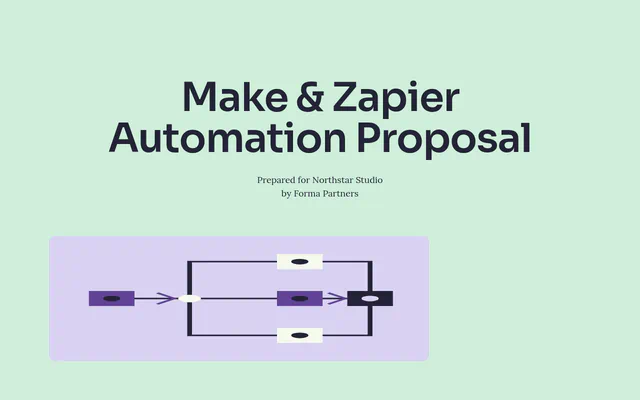
Make and Zapier Automation Proposal
Make and Zapier proposal with three automations, human checks where money is involved, a three-week timeline and three options.
Start free. No card required.
Make this template yours
A clear structure
A starting point for the scope, pricing and next steps you want to share
Ready to edit
Keep useful pages and replace the content with your client details
Your brand
Choose the colors, fonts and imagery that fit your business
About this template
A Make or Zapier automation proposal explains which manual copying between apps you will automate, what a person still checks, which platform you will use and why, and what it costs to build and run. This template is written for a small studio moving enquiries and projects between five apps by hand, with three one-time options.
Who this template is for
No-code automation freelancers and agencies working with studios and small firms that run on tools like Pipedrive, Asana, Slack and QuickBooks. It suits small, fixed-fee projects of a few automations delivered in weeks.
How to structure a no-code automation proposal
Show the hours lost by task from the client’s own time log. For each automation, list the trigger, the action and what a person still checks, so the client sees nothing important happens unseen.
Explain the platform choice, such as Make or Zapier, by cost at the client’s volume and the steps involved, and say how access is limited, what happens when a run fails and what the platform costs each month.
How to price automation work
Price as a small one-time project with options by the number of automations, and a period of fixes after handover. Offer extra automations and a short training session as priced extras, with platform subscriptions paid by the client.
Before you send it
- Use the client’s time log
- Replace the sample hours with what the client’s team actually spends.
- Check app plans
- Confirm the client’s app plans allow API access for each step.
- Name the owner
- Say who will look after the automations after handover.
Who it’s for
- No-code automation freelancers and agencies
- Studios and small firms running on Pipedrive, Asana and QuickBooks
- Small fixed-fee automation projects
What makes it work
- Hours by task chart from the client’s time log
- Three automations: trigger, action and what a person checks
- Platform choice, access, failures and costs in tabs
- A three-week timeline and handover list
- Three one-time options, with extra automations
Time to customise: about 20–30 minutes.
What’s in the Make and Zapier Automation Proposal
9 parts, in the order your client reads them. Every part is editable: keep what fits the job, rewrite the rest and add your own.
Introduction
Your studio receives about 70 enquiries and starts about 14 projects a month. Each one is copied by hand between your website form, Pipedrive, Asana, Google Drive and QuickBooks.
Your situation
From your Pipedrive, Asana and QuickBooks records for July to September.
Covers: Slow first replies, Projects start incomplete, Duplicates in Pipedrive
Three automations
Each one follows the same three steps, and stops for a person where clients or money are involved.
Platform, access and costs
Both Make and Zapier connect all five of your apps. We recommend Make because project set-up has several branches, which Make shows on one screen, and because it costs less at your volume.
Your team and a similar client
Covers: Results for a similar client
Timeline
We go through 20 recent enquiries and 5 new projects with your studio manager, set up the Make account and connect your apps.
Covers: At handover you receive
Options and fees
Three options. We recommend Three automations.
Questions
Nothing is lost. The record waits in the form, Pipedrive or Asana, a message goes to Slack, and your studio manager can do that one by hand, as today.
Next steps
Pick an option and any extras, then accept on this page.
Frequently Asked Questions
Should I use Make or Zapier?
It depends on volume and complexity. Make is often cheaper for multi-step workflows at higher volumes; Zapier is simple for straightforward links between popular apps. Compare costs at the client’s volume.
What happens when an automation fails?
Design it so the record waits in the source app, an alert goes to the team, and that item can be handled by hand.
What should an automation proposal include?
Hours lost today, each automation’s trigger, action and human check, the platform choice, access and failure handling, running costs, a timeline and price options.
Can the client change automations later?
Yes, if you hand over a list of automations and train someone on the platform. Offer support for changes as an option.
What does the Make and Zapier Automation Proposal template include?
9 editable parts, in this order: Introduction, Your situation, Three automations, Platform, access and costs, Your team and a similar client, Timeline, Options and fees, Questions and Next steps. Keep the parts that fit the job, rewrite the rest and add your own.
How is pricing set out in the Make and Zapier Automation Proposal template?
As three one-time options the client can choose between: Enquiry intake ($1,600), Three automations ($3,900, recommended) and Three automations and care ($5,200). Payment terms: 50% on acceptance, 50% at handover. The prices are examples; replace them with your own before you send it.
How long does it take to customise?
Plan on about 20–30 minutes to replace the sample client, scope, dates and prices with your own, then preview it as your client will see it.
How do I send it to my client?
Share it as one link your client can read on any device, comment on, accept and e-sign, or export a PDF for your records.

Ready to make it yours?
Add your scope, pricing and brand. Preview the client experience before sharing.